
Disclosure: Some of the links in this article may be affiliate links. If you purchase through these links, we may earn a small commission at no extra cost to you. This helps support our lab. Read our full Disclaimer for more information.
Choosing between WordPress vs Blogger for AdSense approval shouldn’t be a stressful guessing game. You pour hours into writing articles, hit submit, and get slapped with a vague “Low Value Content” rejection. It is infuriating.
You do not have to endure weeks of automated rejections.
In this guide, I am pulling back the curtain based on real-world data. I will show you exactly how choosing between WordPress and Blogger dictates your approval speed, your layout compliance, and your ultimate earning potential. Let’s engineer a setup that passes the manual review on the first attempt.
Bottom Line
- Google uses the exact same eligibility rules for both platforms during the review process.
- A custom top-level domain name is vital to skip regional restrictions and look professional.
- WordPress offers much better automated setup options to maximize your ad earnings later on.
Table of Contents
Core Differences Between WordPress and Blogger
To understand the approval algorithms, you must first understand the backend infrastructure.
Blogger is a fully managed service owned by Google. They handle your hosting, uptime, and server security natively. WordPress (self-hosted) is open-source software. You control the core files and host them on a private server you rent.
Here are the core technical constraints side-by-side:
| Technical Feature | Blogger (Blogspot) | Self-Hosted WordPress |
| Initial Cost | Free | Hosting & Domain Cost Required |
| Platform Ownership | Google Owns the Infrastructure | You Own Your Data and Files |
| Layout Flexibility | Limited to XML Templates | Unlimited via Themes & Page Builders |
| Plugin Ecosystem | No Plugins (Manual Widgets) | Thousands of Free & Premium Plugins |
| Maintenance Burden | Zero (Google handles backups) | Manual Updates & Security Tasks |
| Ad Code Injection | Built-in Tab or HTML Widgets | Automatic via Plugins or Hooks |
My Hands-On Experience Testing Blogger vs WordPress
The Real-World Test: The biggest myth in publishing is that one platform magically gets approved faster.
To test exactly how the algorithm treats different content management systems, we launched two separate niche blogs simultaneously. One utilized a standard Blogger framework; the other ran on a self-hosted WordPress stack.
We applied for ad monetization once both sites reached 15 posts.
The results were eye-opening. The automated crawler’s review speed was almost identical. The underlying software did not change Google’s final decision.
What actually mattered was having clean coding, easy navigation menus, and genuinely helpful text.
Analyzing the Ad Network Review Metrics
Many beginners blindly assume Google favors Blogger simply because they own the infrastructure.
This is entirely false. The review algorithm enforces identical programmatic eligibility standards across the board. The bots ruthlessly scan for unique Information Gain, user-friendly mobile layouts, and strict legal compliance, regardless of your host.
| Crawler Metric | What It Checks (Key Focus Areas) |
| Content Quality | Verifies the originality, value, and structural depth of your articles. |
| Site Architecture | Confirms clean navigation menus and checks that all links are fully functional. |
| Technical Compliance | Evaluates clear privacy consent setups and correct ad code placement. |
How Blogger (Blogspot) Handles the Setup Process
Setting up an account through Blogger is highly straightforward because it features a built-in “Earnings” tab right inside your dashboard.
Once your blog qualifies, you can connect it to your ad account with just a few clicks.
But if you are wondering if Blogger is good for long-term revenue, the answer depends heavily on your domain setup.
If you stick with the free .blogspot.com subdomain, you can apply, but you face stricter scrutiny regarding your perceived authority.
That is why I highly recommend connecting a custom top-level domain like a .com to your Blogger site. It skips regional age rules and instantly makes your blog look like a serious, independent business to the automated reviewer.
How Self-Hosted WordPress Handles Ad Reviews
With self-hosted WordPress, you connect to the ad network manually by pasting a snippet of code into your website’s header section.
Even though it takes an extra step, the absolute layout freedom you get with WordPress makes it way easier to build a polished, compliant design that satisfies automated site policies.
Google requires clear, intuitive site behavior. Broken menus or hidden category pages will result in an immediate “Navigation Error” rejection.
On WordPress, using clean, lightweight themes lets you set up compliant headers, footers, and sidebars instantly.
You also have direct access to your source files. This allows you to drop in code snippets safely using simple code-insertion tools or native theme hooks without worrying about accidentally breaking your design.
Monetization and Earning Potential Comparison
When looking closely at Blogger vs WordPress for earning potential, the real gap shows up after you get approved.
Getting your site verified is just step one. Maximizing your ad revenue depends entirely on ad viewability, layout testing, and programmatic control.
| Platform | Core Ad Insertion Method | Layout & Testing Control |
| Blogger | Fixed Widget Areas | Limited Ad Testing Layouts |
| WordPress | Global Hooks / Plugins | Auto-Insertion, A/B Testing, Vignette Controls |
Blogger limits your ad delivery to specific widget areas defined by your chosen template. You can place ads inside the sidebar, below the header, or manually paste code blocks inside individual articles.
But as your library grows to hundreds of posts, managing ad placements manually becomes a total nightmare.
WordPress is widely considered the best blogging platform to earn money because of its incredible optimization ecosystem. Free tools allow you to create automated global insertion rules, such as:
- Automatically placing a native ad block after every third paragraph across all live articles instantly.
- Restricting advertisements on specific compliance pages like your Contact or Privacy Policy.
- Managing modern layout trends like desktop collapsible anchor formats or user data-consent popups.
These features ensure your layouts adapt to changing ad standards while protecting the visual reading experience for your mobile audience.
Essential Technical Setup: SEO Settings
To attract the consistent organic search traffic necessary to sustain ad revenue, your technical optimization needs to be solid.
Reviewing your SEO configurations reveals two completely different approaches.
| Feature | Blogger | WordPress |
| Automated Schema Markup | Manual | Automatic |
| On-Page Content Checklist | None | Advanced |
| Dynamic XML Sitemap | Basic | Real-Time |
| Custom Robots.txt Controls | Text-Box | Advanced |
Blogger includes basic, built-in optimization controls under its settings panel. You can manually adjust your meta descriptions and modify custom robots.txt parameters.
While this works fine for basic indexing, any advanced changes require editing raw theme code manually.
WordPress hands over complete control via advanced suites like Rank Math. These tools provide real-time checklists as you write, verifying that your target terms appear correctly inside your headings, image alt attributes, and URL structures.
If you opt for this self-hosted route, make sure to read our breakdown of the GeneratePress free theme SEO settings to ensure your core vitals and loading speeds remain fast.
Pros and Cons of Each Platform for Beginners
Blogger (Blogspot)
- Pros: Entirely free to run indefinitely with zero web hosting renewal invoices. Google handles server security, SSL certificates, and file backups completely.
- Cons: You do not own the platform. A sudden policy violation can result in losing your site. Highly restricted layouts make it difficult to scale into an authority brand. It lacks a plugin ecosystem.
WordPress (Self-Hosted)
- Pros: Absolute ownership of your data, files, and monetization configurations. Direct access to thousands of layout templates and speed optimization tools. Advanced ad plugins improve click-through rates.
- Cons: Requires a small financial commitment for web hosting services and domain registration. The site owner must handle software updates and cloud backups. It has a slightly higher initial learning curve for absolute beginners.
Common Pitfalls That Lead to Ad Rejections
Understanding why sites fail the publisher review can help you fix structural issues before submitting your application. Most rejections happen due to three common errors:
- Low-Value Content: Publishing short, superficial text blocks that fail to satisfy user intent. Google demands comprehensive information. If you use software to assist your drafting process, you must read our exact blueprint on how to make AI content human written to successfully blend personal insights into your raw drafts.
- Broken Site Navigation: Placing broken links in your primary menu bar or leaving placeholder categories empty. The reviewer requires a clean layout where every single link points to live content.
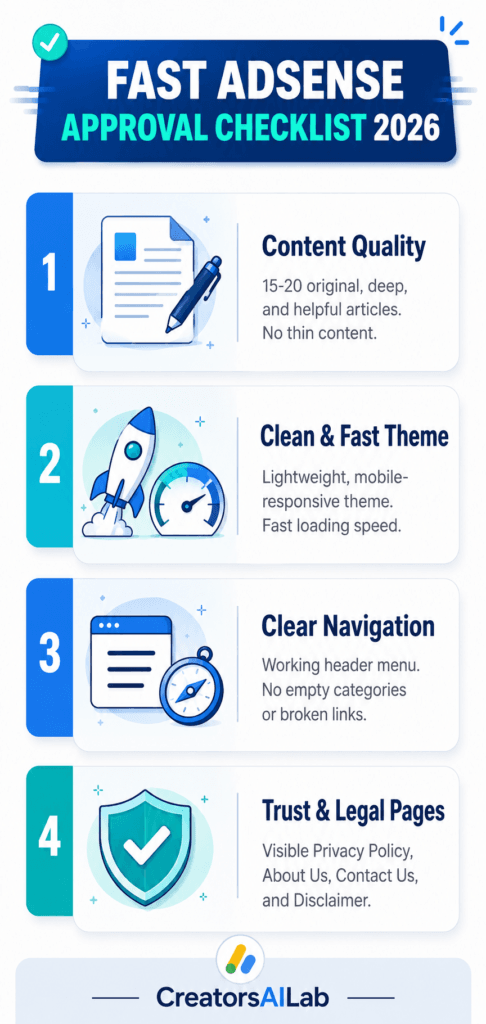
- Missing Trust and Legal Pages: Failing to present clear informational pages is a major red flag. For a smooth publisher approval, your blog must feature a visible Privacy Policy, an About Us page, a Contact Us page, and a Disclaimer. These pages prove to the reviewer that your site is a legitimate, transparent platform.
Actionable Best Practices for Fast Approval
To give yourself the best chance during both the automated and manual review processes, follow these simple industry rules:
- Publish Comprehensive Content: Write at least 15 to 20 well-structured, original articles. Focus on detailed, thorough guides that fully answer the specific user search query.
- Use a Clean, Fast Theme: Select a lightweight, responsive theme that loads quickly on mobile screens.
- Build a Transparent Header Menu: Ensure your main menu bar links clearly to your working categories and your core legal pages.
- Connect Google Search Console: Verify your root domain inside Search Console to ensure your URLs are indexed properly and contain no critical crawl errors.
FAQs Related to WordPress vs Blogger for AdSense Approval
1. Is Blogger completely free to use with display ads?
Yes. Blogger does not charge any money for hosting services or subdomains. You can run ads on a standard Blogspot domain and keep your earnings without paying platform fees, though a custom domain is highly recommended for branding.
2. Does WordPress get approved faster than Blogger?
No platform receives special treatment or accelerated speeds. However, because WordPress allows for better site navigation setups and clean menu structures, many publishers find it easier to fix layout errors that could otherwise trigger an automated rejection.
3. Can I apply for monetization using a free Blogspot subdomain?
Yes, you can apply using a standard subdomain. However, a custom domain usually overrides specific regional age restrictions and builds better trust with the automated review bots.
4. Which platform offers better layout options for ad placements?
WordPress offers superior ad placement control. Through advanced plugins, you can inject ad boxes automatically throughout your text blocks, run performance variations, and control precisely where ads appear on mobile screens.
To ensure your site meets all the latest eligibility requirements, we highly recommend reviewing the official Google AdSense Program Policies. Additionally, to understand how the review bots evaluate your text quality, read the Google Search Central Helpful Content System Documentation.

Very helpful post
Thanks for your appreciation