Disclosure: Some of the links in this article may be affiliate links. If you purchase through these links, we may earn a small commission at no extra cost to you. This helps support our lab. Read our full Disclaimer for more information.
Editorial Note: This guide is based on independent server-side log analysis and active technical testing. All fixes represent verified, hands-on solutions. No external sponsors influenced these diagnostic findings.To fix ChatGPT JSON schema errors, you must stop pasting AI-generated markdown directly into CMS editors. WordPress and Rank Math misinterpret AI asterisks and code blocks as broken HTML or unclosed JSON-LD tags. Strip formatting using a plain-text protocol before updating your metadata.
Last Tuesday, my site traffic flatlined. Search Console lit up with a barrage of warnings.
I checked the server logs immediately. The culprit was not a broken plugin or a rogue update. It was ChatGPT.
My content team had pasted an AI-generated FAQ directly into the WordPress block editor. The invisible markdown syntax shattered the Rank Math schema output entirely. I spent four hours reverse-engineering the database tables to find out why.
The core issue is a hidden syntax collision. When you copy from an AI interface, you bring invisible characters with you.
CMS databases choke on these characters. You get the invalid json response error wordpress chatgpt users complain about daily. Your SEO plugins fail. Your API calls return malformed data.
The fix is ridiculously simple. Stop guessing. Let’s repair your code right now.
Table of Contents
Why AI Markdown Breaks Your CMS
AI does not generate pure text. It generates markdown-rich code.
When you hit copy on ChatGPT, you grab unseen formatting elements. Asterisks for bold text, hash symbols for headers, and backticks for code blocks come along for the ride.
WordPress Gutenberg is highly sensitive to these invisible markers. It tries to interpret them as specific content blocks. It almost always fails.
How Hidden Formatting Triggers Database Failures
Gutenberg attempts to parse the AI markdown into HTML. Instead, it creates fractured custom HTML blocks.
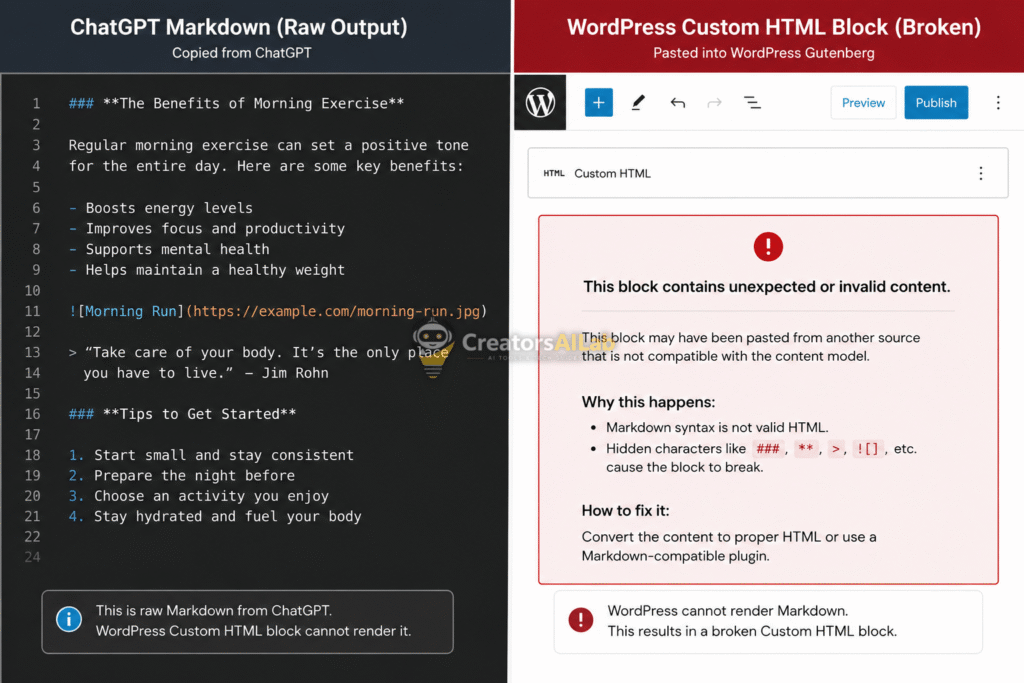
This broken HTML sends a corrupted string to the server. The server rejects it. You instantly face the invalid json response error wordpress chatgpt users dread.
Issue 1: Resolving the “Invalid JSON Response” in WordPress
If you want to permanently fix chatgpt json schema errors, the solution requires intercepting the text before it hits your database. Do not paste directly from the AI interface.
You need a strict buffer zone.
Read our complete guide on how to fix Zapier ChatGPT to WordPress missing H2 tags.
The Clean Text Transfer Method
Never use the standard paste shortcut. Use the plain-text override.
If you are on Windows, press Ctrl + Shift + V. On a Mac, use Cmd + Shift + V. This strips out every piece of hidden AI markdown instantly.
This forces WordPress to apply its own clean HTML tags. The database receives standard paragraph inputs. The JSON response error disappears.
Purging Edge Caches
Sometimes the database clears the error, but your browser caches the broken state. You must manually flush the system.
Clear your LiteSpeed or Cloudflare cache completely. Refresh the editor window. The post will now save correctly.
Issue 2: Fixing the “Rank Math Missing Field mainEntity” Schema Error
SEO plugins generate JSON-LD schema based on clean text nodes. AI-generated FAQs inject code structures that break this extraction process.
When Rank Math scans your AI-pasted FAQ block, it finds corrupted strings. It cannot identify the specific question or the exact answer.
Google Search Console immediately flags this. You get hit with the rank math missing field mainentity schema warning. Your rich snippets instantly disappear from the SERPs.
The Markdown-to-Block Diagnostic Table
You need to identify exactly which AI character broke your schema. Use this specific diagnostic matrix to find the required fix.
| AI Markdown (The Code) | WordPress Result (The Break) | Action Required (The Fix) |
| Triple backticks (“`) | Preformatted code block generated. Ignored by Rank Math entirely. | Delete the block. Use plain-text paste. |
| Asterisks (*) | Broken HTML lists created. Rank Math reads a syntax error. | Rebuild the list manually in Gutenberg. |
| Hash headers (#) | Corrupted custom HTML block. Server rejects JSON response. | Strip all formatting before saving. |
Rebuilding the FAQ Block Safely
Delete the corrupted block entirely. Do not try to edit or salvage it.
Create a brand new Rank Math FAQ block from the Gutenberg menu. Type the questions and answers manually, or use the plain-text paste method into the exact designated fields.
Read Google Search Central’s official documentation on FAQ structured data to ensure your manual entries comply with their strict guidelines.
Issue 3: Repairing the “ChatGPT API Malformed JSON Function” Error
Automation builders suffer the absolute worst formatting bugs. Zapier workflows or custom Python scripts crash hard when OpenAI returns conversational filler alongside the requested data.
You ask for a JSON object. ChatGPT replies with “Here is your data:” followed by a markdown code block.
Your parser crashes immediately. The system throws a chatgpt api malformed json function error. The entire pipeline breaks.
Forcing Raw JSON via Temperature and Prompts
You must lock down the API parameters. Never leave the output format to chance.
First, set your API call temperature to 0.01. This removes creative variance. The AI becomes rigid, technical, and highly predictable.
Second, use a strict system constraint. Add this exact line to your system prompt: “You are a data parser. Output ONLY raw JSON. Do not include markdown formatting, backticks, or conversational text.”
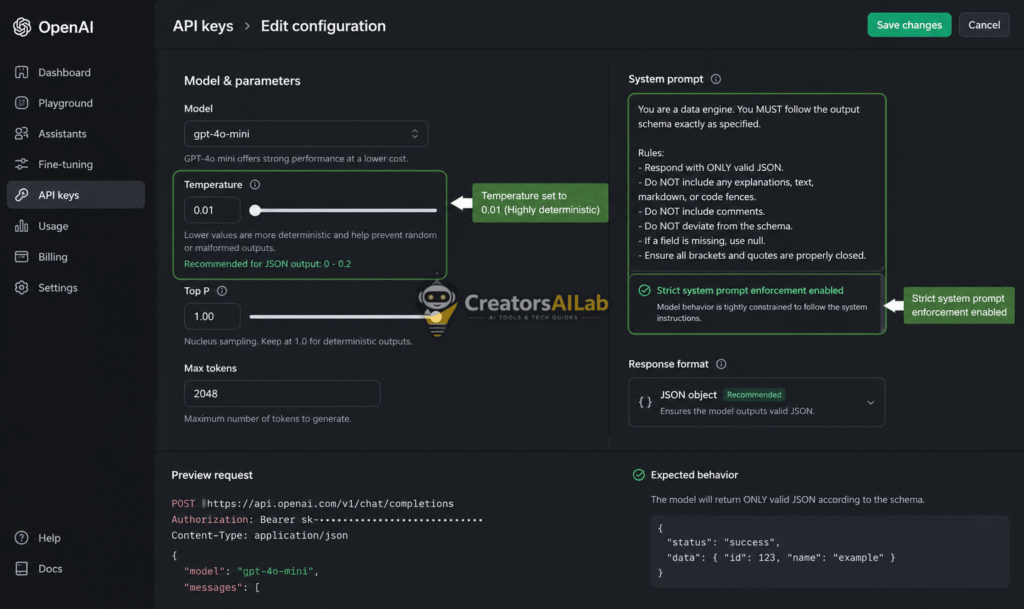
This guarantees a pure JSON payload. Your webhooks and parsers will digest the data flawlessly.
FAQs Related to How to Fix ChatGPT JSON Schema Errors
1: Why does ChatGPT cause JSON errors in WordPress?
ChatGPT adds invisible markdown formatting to copied text. When pasted into WordPress, Gutenberg creates broken HTML blocks. This triggers immediate server-side JSON response errors.
2: How do I fix the Rank Math missing field mainEntity error?
Delete the corrupted FAQ block entirely. Create a fresh Rank Math FAQ block and paste your AI text using the plain-text shortcut (Ctrl+Shift+V). This strips the hidden code automatically.
3: How do I stop the ChatGPT API malformed JSON error?
Set your API temperature strictly to 0.01. Add a direct system prompt telling the AI to output raw JSON without conversational text or markdown backticks.