Disclosure: Some of the links in this article may be affiliate links. If you purchase through these links, we may earn a small commission at no extra cost to you. This helps support our lab. Read our full Disclaimer for more information.
Starting a digital content creation journey is exciting, but let’s address the reality: your production value determines your survival rate.
Viewers expect crisp visuals and pristine audio from day one. Recording tutorials or vlogs with buzzing audio and grainy, dark footage destroys your brand authority instantly.
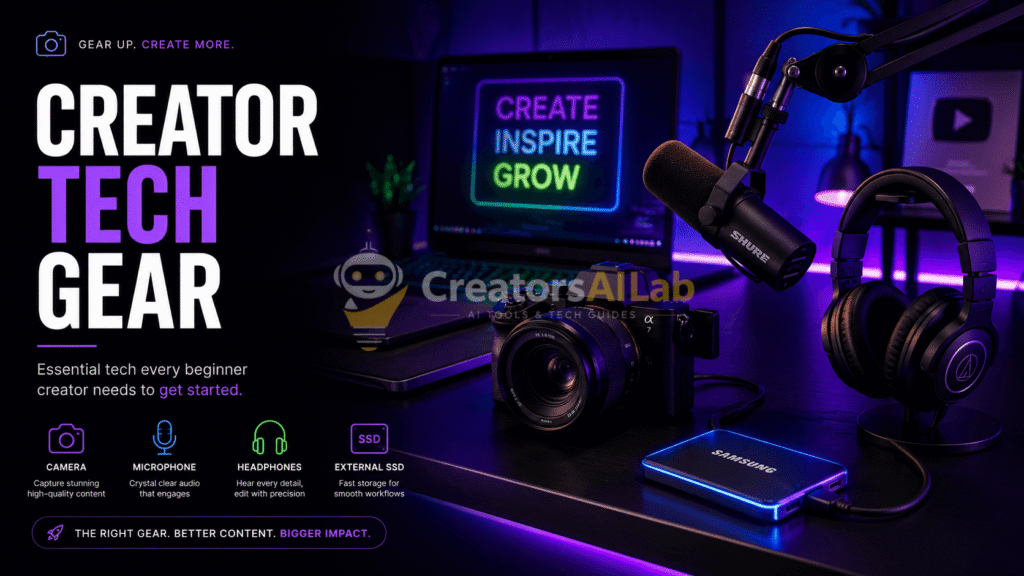
However, building a professional studio in 2026 doesn’t require a Hollywood budget. Investing in the right essential creator tech gear is the ultimate cheat code to elevating your media quality without going broke. Here is the exact, zero-fluff hardware stack you need to build a rock-solid production foundation.
Bottom Line:
- Audio First: Spending your budget on a proper microphone and simple lighting yields a much higher return than buying a premium camera body alone.
- No Overspending: You do not need Hollywood studio equipment to start. Affordable, intelligent gadgets deliver crystal-clear results.
- Editing Speed: Recording high-quality raw footage cuts down your post-production clipping and color correction times in half.
Table of Contents
Why Upgrading Your Studio Hardware Architecture is Mandatory
Your physical gear directly dictates your algorithmic visibility. Major search and video networks track audience retention ruthlessly.
If your clips suffer from dark framing or echoing audio, users bounce in seconds. That high exit rate signals to search crawlers that your page is useless, tanking your organic traffic.
Beyond algorithms, a clean hardware system eliminates editing friction. Capturing high-quality raw files means you stop wasting hours attempting to fix broken colors or background hiss in post-production.
Once your technical hardware pipeline is running smoothly, apply our step-by-step on-page SEO checklist for AdSense to format your articles for fast platform approval.
Top 10 Essential Creator Tech Gear Checkpoints
Forget the expensive cinematic rigs. Here are the core, non-negotiable hardware components required to run a professional home studio:
1. The Mirrorless Camera Foundation
While modern smartphones work fine for casual daily updates, a dedicated mirrorless camera forms the true core of a professional studio space. Look for budget-friendly mirrorless bodies that support clean 4K output, quick face-tracking autofocus, and an external mic port.
Platforms like the Sony ZV-E10 or Canon EOS R50 are built explicitly for solo web publishers. They feature flip-out screens so you can track your framing easily while speaking.
2. The Studio Condenser or Dynamic Microphone
As we have discussed in our digital media guides, audio clarity is far more critical than visual resolution. A user will easily sit through a basic video if the dialogue sounds pristine, but they will mute a track filled with deep room hums instantly.
If your raw audio is completely broken, even the top processing software cannot save your track.
For home setups, running a Dynamic USB mic like the Audio-Technica ATR2100x or Shure MV7X is ideal because they naturally block out room echoes and fan noises.
For a deeper look into proper microphone placement and acoustic treatment on a budget, check out the official Shure Home Recording Guide for Beginners.
3. Advanced Key Lighting (The Softbox Setup)
You can own an expensive cinema camera, but if your recording room is dark, your final video will look grainy and cheap. Camera sensors need a lot of physical light to build clean digital files.
Instead of relying on harsh ceiling lights that create bad shadows under your eyes, invest in a continuous LED studio light like the Godox SL60W. Passing this beam through a diffusion softbox creates soft, beautiful illumination across your face.
4. Heavy-Duty Aluminum Studio Tripod
A shaky video frame looks untrustworthy and causes quick viewer fatigue. To keep your shots rock-solid and secure, a heavy-duty aluminum tripod is a fundamental asset. Never risk your camera gear on a flimsy, cheap plastic stand.
Look for tripods that feature fluid pan heads. This component allows you to execute smooth horizontal and vertical camera pans while filming cinematic product close-ups.
5. Multi-Protocol USB Audio Interface
If you decide to upgrade your studio from a standard USB plug microphone to a professional studio XLR mic, an external audio interface becomes mandatory. This hardware device converts the raw electrical signals from your mic into high-resolution digital streams.
Options like the Focusrite Scarlett Solo or Volt 1 feature high-quality preamps that boost your voice without adding loud background hiss, giving you physical volume knobs to control your levels instantly.
6. High-Performance Studio Monitor Headphones
You cannot properly fix or mix your sound tracks if you are listening to your timeline playback through cheap consumer earbuds. Consumer headphones are engineered to artificially boost bass levels, which completely hides raw flaws, pops, and hisses.
Investing in industry-standard monitor headphones like the Audio-Technica ATH-M50x is vital for post-production editing. They deliver a perfectly flat, transparent frequency response so you hear your tracks exactly how they sound.
7. High-Speed External SSD Storage Assets
High-definition video tracks consume massive blocks of storage space incredibly fast. If you try to save all your raw camera card dumps directly onto your laptop’s internal hard drive, your entire system will slow down to a crawl.
A high-speed external Solid State Drive (SSD)—like the Samsung T7 or SanDisk Extreme—is an absolute necessity for 4K workflows.
Pro Tip: Once your physical storage is secured, you must automate your file organization. Integrate the best AI tools for content creators to keep your media pipelines and cloud backups perfectly synced.8. Adjustable Desk Microphone Boom Arm
Never leave your studio microphone on a cheap desktop stand right next to your keyboard. It acts like a seismograph, picking up every mechanical keyboard click, desk bump, and PC fan vibration.
Clamping a flexible boom arm like the Rode PSA1 to your desk isolates the microphone from physical impacts. It allows you to lift the mic off the table and position it a few inches away from your mouth for a rich vocal tone.
9. Compact Portable LED RGB Fill Lights
Once your main key light is set up, adding color depth to your background environment is the next big step. Plain white walls look dull on camera.
Pocket-sized lights like the Ulanzi VL49 allow you to inject custom splashes of color onto your background walls. You can set these small panels to deep purple, neon blue, or warm orange tones to separate your silhouette cleanly from the background.
10. High-Speed USB-C Hub and Docking Station
Modern slim laptops are powerful, but they often lack the physical plugin slots needed to connect your camera, microphone, interface, external SSD, and monitors at the same time.
A robust, powered USB-C docking station works as the central connection hub of your entire creator workspace. Choose a hub that includes an HDMI output slot, multiple USB-A ports, and a fast SD card reader for quick media card dumps.
Strategic Studio Hardware Integration Matrix
Building your dream production studio is a gradual, step-by-step process. You should never feel forced to buy all ten assets at once. Focus your investments where your channel needs it most:
| Current Studio Problem | Target Hardware Fix | Main Production Benefit |
| Grainy, Dark Video Quality | LED Continuous Light + Softbox | Instantly removes visual sensor noise. |
| Ecohy, Distant Audio Echoes | Dynamic XLR/USB Mic + Boom Arm | Isolates your voice from room reflections. |
| Choppy Laptop Video Editing | High-Speed External SSD (1000MB/s+) | Frees up system drive memory for fast rendering. |
FAQs Related to Essential creator tech gear for beginners
1: Do I need an expensive camera to start a YouTube channel?
No. Most modern entry-level mirrorless cameras or even high-end mobile phones can capture great footage if your room has a proper LED key light and softbox setup.
2: What is the difference between a condenser and a dynamic microphone?
Condenser mics are highly sensitive and work best in quiet, soundproof spaces. Dynamic microphones are much better at blocking out background home noises like fans, keyboards, and street traffic.
3: Why should I edit video files from an external SSD?
Editing directly from a high-speed external SSD keeps your computer’s internal storage free, preventing your editing software from lagging or crashing during heavy video rendering tasks.
Final Verdict & Next Steps
Upgrading your creation setup from a basic hobby corner to a professional studio workspace completely changes how you work. It turns an exhausting manual process into a clean, enjoyable production flow.
Prioritize your gear purchases based on your current channel blocks, keep your layout mobile-friendly, and watch your media brand grow naturally!