

Disclosure: Some of the links in this article may be affiliate links. If you purchase through these links, we may earn a small commission at no extra cost to you. This helps support our lab. Read our full Disclaimer for more information.
Starting a faceless YouTube channel is an incredible way to build a digital asset. But editing a beautiful video for hours only to get hit by the dreaded “Reused Content” demonetization flag is a total nightmare.
I promise you do not have to live in fear of losing your channel’s future earnings. Finding the best free AI voice generators for YouTube Shorts is entirely possible if you know where to look.
Today, we will break down five outstanding free tools that sound incredibly human. We will look at their actual limitations, their legal usage rights, and exactly how to keep your channel perfectly safe for monetization.
Bottom Line:
- YouTube does not automatically ban text-to-speech tools; it rejects lazy, unedited scripts that sound like mindless spam bots.
- Always check the fine print because many “free” tools do not legally allow you to monetize your videos without a paid license.
- Layering background music and sound effects over your generated track drastically lowers your risk of an algorithmic rejection.
Table of Contents
Does YouTube Demonetize AI Voices in 2026? (The Truth)
Let us clear the air right now. Google and YouTube have stated openly that they do not hate Text-to-Speech (TTS) software.
Here is the catch: they absolutely despise unoriginal, low-effort content. If you generate a generic script using an AI tool, paste it into a robotic voice reader, and throw static images over it, you will likely get rejected from the partner program.
Look: your channel needs to offer genuine value. To get AdSense friendly audio, you must focus on tools that offer a natural, human-like intonation and pitch. When your audio sounds natural, your audience stays longer. This extended watch time signals to the algorithm that your content is high-quality and worthy of ad placement.
Before you launch your next video project, it is highly recommended to read the official guidelines on how to keep your automated setups fully compliant. You can study the current rules directly on the YouTube Channel Monetization Policies.
5 Best Free AI Voice Generators for YouTube Shorts Monetization
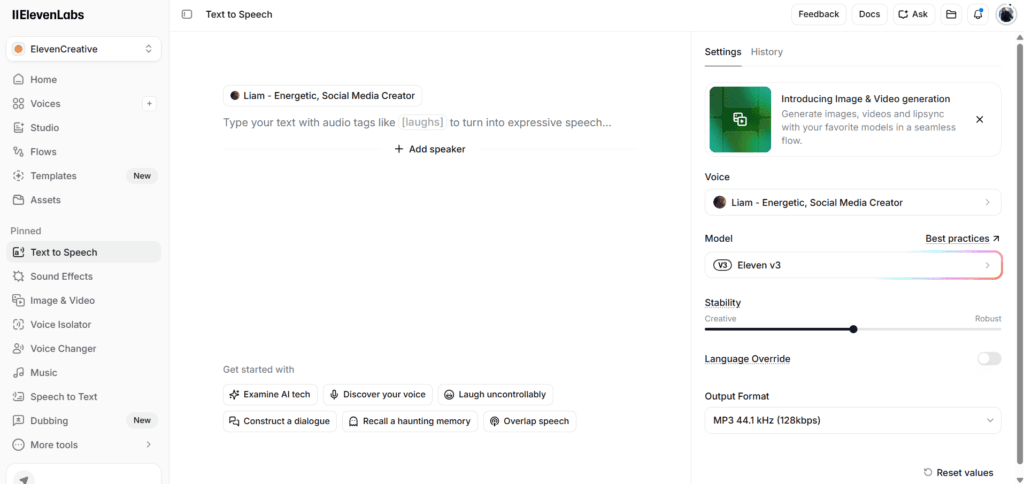
1. ElevenLabs (Best for Realism)
ElevenLabs is widely considered the undisputed king of realistic speech generation. Their deep-learning models capture the tiny pauses, breaths, and emotional shifts that make a voice sound truly authentic.
- The Pros: The voices sound incredibly natural. It is almost impossible for an average listener to tell that a human did not record it.
- The Cons: Their free plan enforces strict character limits per month (10,000 characters). This gives you roughly 5 to 7 minutes of audio depending on your speaking speed.
- The Catch: If you use the free tier, you must explicitly include a credit link to their platform in your video description to maintain your commercial use rights.
2. Clipchamp (Best for Unlimited Free Access)
Owned by Microsoft, Clipchamp is a hidden gem for short-form creators. Because it is a full video editor, its text-to-speech engine is completely integrated and surprisingly powerful.
- The Pros: There are no annoying character cutoffs or word limits. You can generate unlimited voiceovers without paying a single dime.
- The Cons: You cannot easily export the audio file by itself. You have to create the video inside their timeline and export the whole project together.
- The Catch: While it is a massive time-saver, the voice customizability is fairly basic. You cannot tweak the specific emotion or individual syllable stresses heavily. It provides a solid, steady free text to speech for youtube shorts monetization option.
3. CapCut Desktop (Best All-in-One Integration)
CapCut is the default choice for millions of TikTok and Shorts creators. Its desktop version includes highly popular, trending creator voices that viewers are already familiar with.
- The Pros: The tool is incredibly fast. You type your text directly onto the video timeline, click “Text to Speech,” and a realistic voice is applied instantly.
- The Cons: Some of their most realistic voices are locked behind their “Pro” subscription model.
- The Trick: Stick to their mainstream, clear narrator voices. They are highly recognized and safe for social media use.
If you want to build your entire video pipeline without spending money, try pairing your audio with the tools listed in our guide on How to Create Faceless AI Reels.
4. Play.ht (Best for Global Accents)
If your target audience lives across different countries, Play.ht is a fantastic choice. They offer a massive library of regional accents, localized tones, and conversational speech profiles.
- The Pros: Their free tier gives you access to a massive list of realistic voices across dozens of languages. It is a true realistic ai voice generator free without watermark.
- The Cons: The free plan resets monthly but limits your total word generation. It is best suited for short, punchy 30-second scripts.
- The Reality: It is ideal for running quick multi-language tests on a faceless channel ai setup to see which global audience responds best to your content.
5. Lovo.ai / Genny (Best for Emotional Depth)
Lovo is designed specifically for marketing and high-retention video content. Their platform allows you to add specific emotional overlays to the voices, such as excitement, curiosity, or suspense.
- The Pros: Perfect for high-drama niches, historical documentaries, or scary story channels. It is arguably the best ai voice for faceless youtube channel scaling.
- The Cons: The free trial is generous but temporary. Once your initial credits expire, you will have to create a new account or upgrade to continue using their top-tier neural voices.
- The Bonus: They offer powerful voice cloning features if you ever decide to upload a brief sample of your own voice to automate your personal audio tracking later.
Feature Comparison: Commercial Rights & Limits
Choosing a tool blindly can get your channel banned or sued down the road if the platform catches you using non-commercial tracks for profit.
Here is how these five options stack up realistically:
| Voice Generator Tool | Free Plan Character Limit | Commercial Use Allowed Free? | Best Used For |
| ElevenLabs | 10,000 characters / mo | Yes (Must include attribution link) | Ultra-realistic, emotional storytelling |
| Clipchamp | Truly Unlimited | Yes (Built into Microsoft license) | Fast, unlimited daily Shorts creation |
| CapCut Desktop | Unlimited (Standard voices) | Yes (Creator ecosystem friendly) | Trend-driven, fast-paced edits |
| Play.ht | 5,000 words lifetime trial | No (Requires upgrade for full monetization) | Testing global accents and languages |
| Lovo.ai (Genny) | 14-day free trial limits | Personal use only on free tier | High-end emotional video marketing |
How to Mix Your Audio to Avoid the ‘Reused Content’ Trap
Listen closely: simply pasting text and downloading an audio file is not enough anymore. To convince the YouTube monetization reviewers that you are putting real human effort into your videos, you must use smart audio design.
First, drop your generated track into an audio or video editor. Cut out any awkward silences or artificial pauses that make the AI sound obvious.
Next, add a low-volume background track of copyright-free music. Ensure the music volume sits around -20dB so it does not drown out the speech. Sprinkle in real-world sound effects (like whooshes, typing sounds, or ambient room noise) every 4 to 5 seconds to match your visual transitions.
This complex layering gives you highly secure audio mixing and export options that algorithms recognize as original human creations.
Once your audio track is fully mixed with music and visual cues, the final file size might be quite large. Before you upload your completed video clip, please process it through a specialized utility to save bandwidth.
You can find a lightweight option in our comprehensive review of the How to Create Faceless AI Reels
FAQs Related to Best Free AI Voice Generators For YouTube Shorts
1. Can I monetize YouTube Shorts with AI voice in 2026?
Yes, you can. YouTube allows automated voice narration as long as your overall video displays creative editing value, an original script, and proper pacing. Channels only get demonetized when they upload mass-produced, repetitive content.
2. Which free AI voice generator has no watermark or restriction?
Clipchamp offers unlimited generation without adding watermarks or charging hidden fees, making it an excellent baseline choice for new creators. ElevenLabs is also completely clear of watermarks but enforces monthly character caps.
3. Do I need to buy a premium plan to be legally safe?
Not necessarily, but it depends on the tool. ElevenLabs lets you monetize for free if you credit them. However, platforms like Lovo require a paid subscription to grant you full commercial usage rights for your business.
Final Blueprint for Your Channel
Using automated speech tools is a brilliant way to scale your content production quickly. Just remember to focus on the storytelling, keep your scripts engaging, and never let the voice sound completely flat or boring.