
Disclosure: Some of the links in this article may be affiliate links. If you purchase through these links, we may earn a small commission at no extra cost to you. This helps support our lab. Read our full Disclaimer for more information.
When most creators discuss “high-quality video,” they obsess over the visual elements—4K resolutions, expensive prime lenses, and complex cinematic transitions.
However, veteran creators know a brutal truth that beginners actively ignore: audio quality dictates video survival.
A viewer will gladly tolerate standard-definition video if the person speaking sounds crystal clear. But they will abandon your clip in three seconds if the track is plagued by room echo, traffic noise, or a constant microphone hiss. In 2026, deploying the best AI voice enhancer tools for video editing is no longer an optional luxury; it is a baseline necessity. Let’s break down the exact software stacks that can reconstruct your audio with a single click.
Key Takeaways Box
- Retention Booster: Clear vocal tracks directly cut down user drop-off rates on short-form reels and long tutorials.
- Budget Friendly: Smart audio software removes the immediate need to spend thousands on soundproof studio rooms.
- Automation Ease: Most modern tools run directly inside your browser layout or local desktop applications.
Table of Contents
1. Why Vocal Clarity Dictates Video Success and SEO Rankings
Before evaluating individual software choices, we must analyze how sound quality impacts your actual web search rankings. Main search engine algorithms track user interaction signals very closely. Two of the most critical metrics are total watch time and early bounce rates.
If your raw audio forces listeners to strain their ears to understand your words, they will abandon your page within the first ten seconds. This quick exit signals to search bots that your content lacks real value.
The Accessibility Trap: Modern auto-captioning systems and speech-to-text translators rely entirely on clear vocal frequencies. If your raw audio is muddy, automated subtitle software spits out gibberish, instantly ruining your accessibility score.
To ensure these technical drop-offs don’t destroy your overall site visibility, integrate your clean media strategy with our rigorous on-page SEO checklist for AdSense. This guarantees your layout remains pristine and algorithmically approved.
When you integrate professional ai voice enhancer tools for video editing into your daily production line, you build a clean user experience that review networks love to reward with steady organic traffic.
2. Top 5 AI Voice Enhancer Software Options Broken Down
Forget the marketing spec sheets. Here is how the top audio repair tools actually perform during heavy, daily post-production grinds.
| Tool/Platform Name | Primary System Type | Standout Feature | Best Used For |
| Adobe Podcast | Cloud-based web tool | Total vocal reconstruction engine | Cleaning cheap smartphone recordings |
| Descript Studio Sound | All-in-one desktop app | Waveform frequency repair toggle | Text-based video & podcast editing |
| Auphonic | Web automation service | Smart multi-mic leveling tracks | Equalizing interview volume spikes |
| Lalal.ai Voice Cleaner | Dedicated stem extractor | Clean vocal and music isolation | Salvaging raw outdoor public footage |
| CapCut AI Audio | Local desktop program | Instant timeline noise removal | Fast daily short-form social video edits |
1. Adobe Podcast Speech Enhance
Adobe’s dedicated cloud voice tool remains an exceptional asset for digital publishers. Originally created to help remote podcasters, this platform allows you to take a distorted audio file and clean it up completely.
It uses deep learning models to make a basic phone recording sound like it was captured inside an expensive radio broadcasting studio.
The best part about Adobe Podcast is its simple approach. You do not need to understand complicated audio engineering terms like compression gates or low-pass filters.
- Pros: Outstanding room echo removal that adds deep warmth to thin vocal tracks.
- Cons: Requires a steady internet connection to process files through cloud queues.
2. Descript Studio Sound
For publishers who want a single, unified workstation, Descript offers an incredible framework. It is widely known for its text-based editing setup, where you can trim video tracks by simply deleting words from an auto-generated text document.
Built straight into this workstation is their “Studio Sound” feature, which works like an automated audio engineer running silently in the background.
With one quick toggle switch, the software scans your media file, isolates background noise, and strips it away. It actively repairs broken digital waveforms to bring distant voices right to the front.
- Pros: Eliminates the need to export your audio files to external programs.
- Cons: Processing highly complex multi-track timelines can take a bit of local system memory.
If you want to see how this app handles complete multi-format video projects, look at our comprehensive guide on the best ai tools for content creators to scale your workflow.
3. Auphonic
When processing video tracks, keeping your volume levels perfectly balanced across different microphones is incredibly critical. Auphonic functions like an automated mastering engineer.
While other options focus purely on slicing out noise, this web service looks at your entire sound file as a whole.
It balances out the volume gaps between multiple speakers, intro music tracks, and custom sound effects automatically. It ensures loud spikes are limited while quiet whispers are lifted to a clear, audible baseline.
- Pros: Applies official loudness standards required by networks like YouTube and Spotify.
- Cons: The web interface layout looks a bit technical for absolute beginners.
For more details on maintaining proper acoustic specifications, check out the official Adobe Audition User Guide for media producers.
4. Lalal.ai Voice Cleaner
Lalal.ai runs on a highly specialized vocal separation engine. While basic filters only damp high frequencies, this platform is incredibly smart at separating speech from intricate background music loops or chaotic environmental noise blocks.
This setup is highly effective for creators who need to save raw footage recorded in noisy public spots like open markets, busy tech conferences, or loud street cafes.
- Pros: Clean dialogue stem isolation without losing your original audio fidelity.
- Cons: Fast batch exporting requires buying premium processing minute packages.
5. CapCut AI Audio Desktop Suite
CapCut holds a huge share of the short-form media market due to its simple timeline mechanics. To help creators produce viral shorts and reels, they have placed automated audio cleanup tools right into their main settings sidebar.
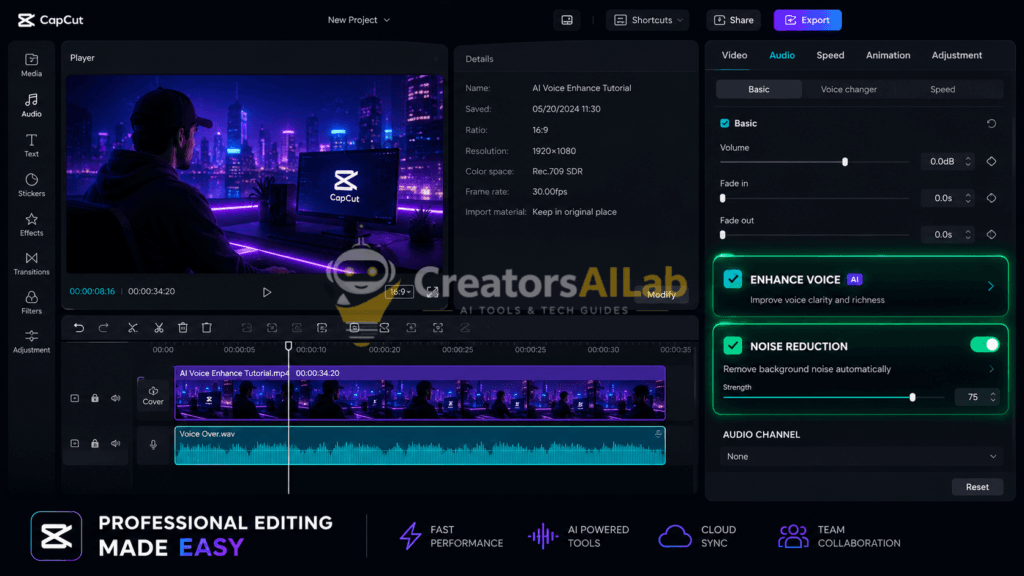
By checking the “Enhance Voice” and “Reduce Noise” boxes, the software applies instant frequency leveling. It works wonderfully for quick voiceovers without waiting for long upload lines.
- Pros: Zero cloud export delays because processing happens directly on your device.
- Cons: Advanced audio tracking modules require a premium Pro account license upgrade.
3. Avoid These Common Mistakes When Processing Digital Audio
While smart software gives you a massive advantage, you must avoid over-processing your media files. A common trap is sliding your enhancement strength filter up to 100% on a file that already has heavy background damage.
Over-processing introduces digital artifacting—making your voice sound metallic, artificial, and entirely robotic.
To keep your tracks sounding professional, always run a final check on your export using basic consumer headphones. If your voice sounds clinical or “hollow,” dial back the processing strength slider by 10%. The objective isn’t absolute silence; the goal is to maintain a warm, authentic human tone while pushing background disturbances out of focus.
If you are having trouble getting your processed media pages indexed on your site, use our step-by-step blueprint on how to fix discovered currently not indexed error to clear the delay.
4. FAQs Related to AI voice enhancer tools for video editing
1: Are these AI voice enhancement tools completely free?
Most options on this list—such as Adobe Podcast, CapCut, and Descript—provide excellent free tiers. As your channel metrics grow, you can opt for paid upgrades to process larger batches of files.
2: Can an AI voice enhancer save an audio track filled with heavy wind noise?
Yes, modern neural networks can recreate missing vocal elements quite well. However, if the source file is heavily distorted, turning down the tool’s intensity helps avoid a metallic sound.
3: Do these audio programs slow down standard laptop computers?
Tools like Adobe and Auphonic process everything inside secure cloud networks, meaning they will not slow down your local device at all.
5. Final Verdict & Next Steps
Achieving professional-grade audio tracking does not require a massive bank account anymore. Finding the right ai voice enhancer tools for video editing that fit your specific routine will save you hundreds of hours of manual equalizer adjustments.
Pick an application that matches your current editing software, check your final lines with headphones, and watch your viewer engagement grow naturally!
About the Author