
Disclosure: Some of the links in this article may be affiliate links. If you purchase through these links, we may earn a small commission at no extra cost to you. This helps support our lab. Read our full Disclaimer for more information.
Seeing your new pages stuck in the grey zone of Google Search Console hurts. You pour your heart into writing a great post, only to find out that your link is completely invisible to searchers.
I’ve been there. Watching your new content hit a wall in Search Console is frustrating. I’m going to show you exactly how to fix discovered currently not indexed error using a few technical tweaks that work right now.
In this quick guide, we will walk through why Google leaves your pages waiting, how to track this on desktop or android devices, and the exact settings to push your links live.
Key Takeaways Box
- Not a Penalty: This status simply means your page is sitting in Google’s waiting line, not that your site is banned.
- Crawl Budget Issue: Google knows your link exists but has not allocated the time to read it yet.
- Fast Technical Fix: You can bypass this block entirely by using smart internal links and an instant indexing setup.
Table of Contents
1. Discovered – Currently Not Indexed: What Does It Actually Mean?
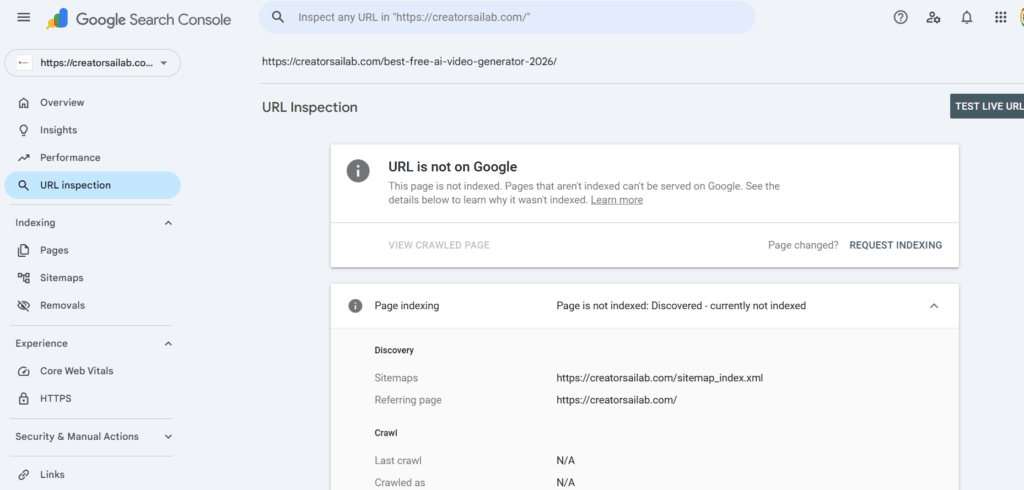
Think of it this way. Google knows your URL exists—it found it via your sitemap or an internal link. But, it has chosen to skip the actual crawl. It’s sitting in a virtual waiting room.
Here is the catch: your page is sitting in a temporary waiting room. Google knows the page is there, but its automated bots are too busy with other tasks to come and scan your text.
2. Crawled vs. Discovered: The Critical Difference
Many bloggers get confused between two very common search console flags. Mixing them up can make you waste time fixing the wrong technical issues.
Let us look at crawled currently not indexed vs discovered side by side so you can easily see what your site needs.
| GSC Status Flag | What Google Did | The Main Root Cause | Your Immediate Action Plan |
| Discovered – Not Indexed | Found the link but did not crawl it. | Crawl budget limits or poor site links. | Improve internal linking and refresh sitemaps. |
| Crawled – Not Indexed | Read the full page but chose to reject it. | Low content value or duplicate text. | Rewrite the post to add unique value. |
3. Why Is Google Ignoring Your Content in 2026? (The Root Causes)
Why does this happen to solid, well-written sites? I see this daily. Let’s break down the primary reasons your site is running into this indexing bottleneck.
Poor Crawl Budget Allocation
Google does not have unlimited time for every website on the internet. If your blog is brand new, search engines only give you a tiny bit of attention each day.
The Silent Killer: Low Internal Linking
If you write a new post but do not link to it from your old, live articles, it becomes an orphan page. Google struggles to prioritize pages that feel disconnected from the rest of your site.
Over-Reliance on Stock XML Sitemaps
Sometimes, standard sitemaps get stuck or lag behind. When your site signals are weak, Google simply leaves your new links at the bottom of its to-do list.
For more details on crawl management, check out the official Google Search Central Crawling Documentation.
4. Step-by-Step Blueprint to Fix the Indexing Block
Now, let us fix the problem. Follow these steps to force Google’s bot to visit your site and index your content quickly.
Step 1: Execute the Content Internal Linking Web
Go to your top-performing, already indexed articles. Add a natural sentence that points directly to your stuck URL using relevant text.
This passes immediate authority to the new post and gives the bot a direct path to find it.
Step 2: Force-Refresh Rank Math Sitemap Settings
If you use WordPress, open your rank math instant indexing setup dashboard. A great trick is to go to sitemap settings, change the links per page count by one number, and hit save.
This simple change forces your site to create a fresh sitemap file, which alerts Google to look at your database again.
Step 3: Trigger the Google Indexing API Bypass
Stop waiting weeks for that manual ‘Request Indexing’ button to do its job. When your logs show ‘Crawled – Currently Not Indexed’ or ‘Discovered,’ you need a more aggressive technical approach.
Setting up the official instant indexing WordPress Google API allows you to send a direct cloud signal to Google the moment you press publish.
If you are also struggling with monetization approvals due to quality flags, read our comprehensive guide on how to fix AdSense low value content error on AI blogs for step-by-step optimization strategies.
How to Write Index-Ready Content from the Start
Want to know how to speed up google indexing for all your future posts? The secret lies in making your text look completely different from standard machine outputs.
- Break Up Text Blocks: Never use massive walls of words. Keep your sections highly visual and easy to scan on mobile screens.
- Add Unique Tools: Insert small custom calculation steps, quick reference data sheets, or actionable checklists.
Use this simple word-swap framework to keep your writing tone natural, professional, and friendly:
| Avoid Using This Robot Word | Use This Natural Human Word Instead |
| Delve into the details | Let us look at |
| Furthermore / Moreover | Also / Additionally |
| Revolutionize the way | Make it easier to |
| In conclusion | Summary / Key Takeaways |
Low Value Content Recovery Checklist
Before you head back to GSC to request another manual check, make sure you tick off these essential boxes.
- Add Internal Links: At least two live, indexed pages must point to the stuck URL.
- Remove AI Phrasing Clichés: Clean out repetitive machine words from your top headings.
- Verify Sitemap Status: Check that the URL is active inside your main sitemap index file.
- Run Speed Testing: Ensure your page loads quickly on both desktop and mobile layouts.
FAQs Related to Fix Discovered Currently Not Indexed Error
1: How long does it take for the “Discovered” error to clear?
It can take anywhere from a few days to three weeks. Using a dedicated indexing API speeds up this process significantly.
2: Does using the Google Indexing API get your site banned?
No. Google built the Indexing API for specific fast-paced pages, but thousands of top publishers use it safely to request rapid crawl logs.
3: Why does my URL show “Unknown to Google” after a manual request?
This happens when Google has zero history of the link in its main crawl log queue. Adding an internal link from your homepage fixes this instantly.
Final Verdict & Next Steps
Indexing delays are just part of the job. Don’t sweat the grey status bar. Clean up your internal linking paths and set up an instant indexing API. That’s how I keep my sites healthy and visible in the SERPs.

Table of content pr click kro tu google pr ja rha hai iss article myn… solve it👍
Thank you for pointing that out, Mateen. I have updated the link settings, and the Table of Contents is now functioning perfectly. Your feedback helps keep the site running smoothly—much appreciated!