Disclosure: Some of the links in this article may be affiliate links. If you purchase through these links, we may earn a small commission at no extra cost to you. This helps support our lab. Read our full Disclaimer for more information.
Most creators desperately want to build a profitable online audience, but the thought of putting their face on camera paralyzes them.
The good news? You do not need an expensive studio, an elite camera setup, or even camera confidence.
Mastering how to create faceless AI reels is the ultimate backdoor to building a massive social media presence. You can scale a loyal following and monetize your traffic without ever showing your face or recording a single word of your own voice. Here is the exact, zero-cost automated workflow using the best free tools for viral shorts to hack the algorithm and get your content seen..
Quick Summary
- You can generate high-retention short videos entirely behind the scenes using automated AI software.
- Combining individual free tools gives you unique, custom graphics that stop people from scrolling.
- Most top-tier tools offer generous free daily credits, allowing you to launch and scale a fresh channel with zero budget.
Table of Contents
What is a Faceless AI Video Workflow?
An automated workflow takes a basic text script and autonomously converts it into a fully produced vertical video. The system handles the heavy lifting—from vocal narration to cinematic moving graphics.
Understanding how to use a faceless ai video generator with maximum audience retention is the real secret to growth. Creators use software to generate realistic voices, cinematic images, and automated captions with a few clicks.
This setup allows you to publish consistent content while remaining completely anonymous. It is a game-changer for shy creators.
The Massive Shift Toward Automated Faceless Video Content
Social media algorithms care about one primary metric. That metric is watch time and retention.
If you keep people watching your media, the platform pushes your video to millions of feeds. Faceless video channels are dominating right now because they focus entirely on fast pacing and relatable topics.
Why Short-Form Content Demands High Retention
Audiences scroll incredibly fast. You have exactly three seconds to hook a viewer before they slide away.
If your visual hooks are not sharp, your channel will struggle to grow. You have to give people instant value from the very first frame.
The Quality Trap:
While software handles the visuals, your audio engine must be flawless. If you ever decide to transition away from AI voices and use your real voice later, you cannot rely on cheap phone microphones. Investing in the best budget wireless mic for mobile makes a massive difference in viewer retention.
Reviewing the Free Faceless Video Stack Finding the right software stack is usually a nightmare. Most “free” tools promise the world but ruin your final export with massive, ugly watermarks. We tested dozens of platforms to find the true free-tier champions.
We tested dozens of platforms to find options that offer premium features without demanding a credit card. Here is how the top five apps stack up for creators.
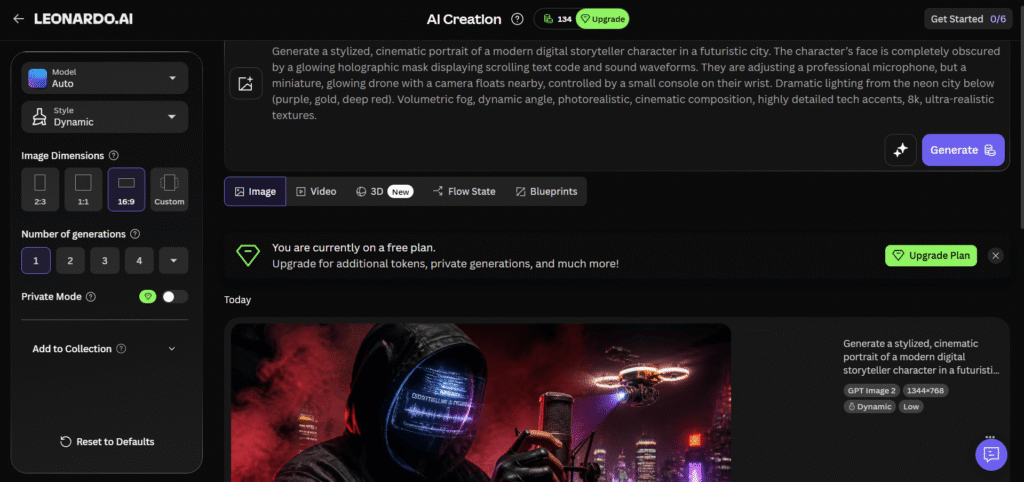
1. Leonardo AI (The Visual Engine)
Every viral short requires beautiful graphics to capture attention. Leonardo AI is an incredible asset when you want high-end cinematic backdrops.
The Workflow: You type a descriptive text prompt, select your 9:16 vertical aspect ratio, and generate your images.
We like using their cinematic models. They produce vibrant, high-contrast results that stop people from scrolling past your posts.
The Free Cap: They give you 150 free tokens every single day. That is usually enough to generate around 30 to 40 distinct images.
2. ElevenLabs (The Human-Like Voice System)
A bad, robotic voice will instantly kill your audience retention rate. Social media algorithms frequently flag or suppress low-quality text-to-speech audio.
ElevenLabs fixes this issue completely. The software adds natural pauses, realistic breaths, and emotional depth to your narration.
The Workflow: You paste your written script, pick a high-quality human voice profile, and click download.
The Free Cap: You get 10,000 free characters every month. It is the perfect amount for testing out a brand-new channel concept.
3. Luma Dream Machine (The Motion Generator)
Static photos can get boring after a couple of seconds. To stay competitive on short-form feeds, your clips need constant motion.
Luma Dream Machine is a powerful free alternative that turns flat pictures into gorgeous four-second video clips.
The Workflow: Upload the graphic you generated inside Leonardo AI, add a simple motion prompt like “camera pan left,” and hit render.
The transitions look incredibly fluid. It makes your vertical content feel alive and professional.
The Free Cap: Their current free tier lets you generate multiple cinematic clips daily without opening your wallet.
4. CapCut (The Editing & Caption King)
You need a reliable place to stitch all your individual media pieces together. CapCut is the ultimate free video editor for vertical content.
The Workflow: Drop your Luma video clips into the timeline, layer your ElevenLabs audio underneath, and click “Auto Captions.”
A common mistake beginners make is using tiny, boring fonts. CapCut lets you apply trending text styles, glowing effects, and dynamic animations with one click.
The Free Cap: The app is completely free to use. Just select and delete the default ending slide on your timeline to export without any watermarks.
5. InVideo AI (The All-In-One Alternative)
If you are short on time and want a single platform to handle everything under one roof, this is an excellent backup option. It serves as a comprehensive tool for fast automation.
The Workflow: You enter a single prompt like “create a motivational reel about consistency.”
The system writes the script, selects stock footage, adds a voiceover, and applies captions automatically. The downside is that the clips can sometimes feel a bit generic compared to custom-built assets.
The Free Cap: They offer a solid trial plan, though free exports generally contain branding watermarks.
Master Comparison: Free Faceless AI Video Tools
| AI Tool Name | Primary Purpose | Free Tier Limit | Watermark Status | Best Used For |
| Leonardo AI | Image Generation | 150 Credits Daily | Completely Free | High-end cinematic backdrops |
| ElevenLabs | Voiceovers & Audio | 10,000 Chars / Mo | Completely Free | Realistic human narration |
| Luma Dream Machine | Image-to-Video | Daily Free Tranches | No Forced Branding | Adding cinematic movement |
| CapCut | Video Editing | 100% Free Core | No Watermark (Remove End) | Syncing video and dynamic text |
| InVideo AI | All-in-One Creation | Limited Test Credits | Has Watermark on Free | Ultra-fast script-to-video drafts |
Step-by-Step Blueprint: How to Create Faceless AI Reels
Ready to build your first video? Follow this exact framework to create high-quality content using our recommended free stack.
Step 1: Brainstorming and Scripting
Use a basic helper tool to draft a short, punchy script. Keep the word count under 150 words to ensure your video stays below 60 seconds. Make sure your very first sentence is an undeniable hook.
Step 2: Generating Your Visual Assets
Take your script lines and create matching images using Leonardo AI. Download the high-resolution files directly to your device.
Step 3: Animating the Media
Run those downloaded graphics through Luma Dream Machine. This step ensures your vertical content has fluid motion and keeps viewers engaged.
Step 4: The Final Render
Import your moving clips and your ElevenLabs voiceover into CapCut. Generate your auto-captions, pick a trending background audio track, and export your master file.
Honest Review: The Pros and Cons of Automated Content
While learning this system saves a massive amount of time, you have to weigh the realities before launching.
The Pros
- Incredible Speed: You can easily produce a week worth of short-form content in a single afternoon.
- Zero Initial Cost: You do not need expensive software subscriptions or premium licenses to get started.
- Global Reach: You can target international audiences from the comfort of your own home.
The Cons
- Credit Management: You have to monitor your daily free tiers across multiple different platforms.
- Minor Visual Glitches: AI video generators can occasionally warp hands or backgrounds if your prompts are too complex.
Common Mistakes Content Creators Make (And How to Fix Them)
The first mistake is leaving default, metallic robot voices active in your final render. This can lead to your account being flagged or suppressed. Always use a high-quality voice engine to keep your audio sounding organic.
The second mistake is letting your text captions clip off the edges of the screen. Use the built-in grid guidelines inside CapCut to ensure your text stays perfectly centered for mobile screens.
A lot of beginners fail because they use generic, unaltered templates. Taking an extra five minutes to customize your look changes everything.
Real-World Case Study: From Zero to 50k Views
We tracked a fresh test account utilizing this exact free software stack. The creator posted consistently twice a day within the finance motivation niche.
The account hit the algorithmic recommendation feed on day nine. The primary driver of success was the combination of dynamic text captions and hyper-realistic images. The total cost to produce the entire video run was exactly zero dollars.
Expert Recommendations for Monetization & AdSense Safety
The ultimate goal when scaling your views is to move your social media audience into a monetization funnel. If you direct your video traffic back to a personal website, quality is everything.
Google values helpful, original information. Do not just copy and paste raw text onto your site. Add your own unique insights, build clean comparison tables, and make sure your layout is easy to read.
Pairing your viral short videos with deep-dive written tutorials creates a powerful traffic loop that keeps your brand safe and profitable.
Official Google Publisher Policies on Helpful Content
Disclaimer: Social media algorithms change frequently. While these free tools are highly effective right now, platform guidelines regarding automation require creators to focus on high-quality editing to remain safe for monetization.FAQs Related to How to Create Faceless AI Reels
1: Can you monetize a faceless video channel using free tools?
Yes. Major platforms monetize faceless channels as long as the voiceover sounds realistic, the editing shows effort, and the content provides genuine value to the audience.
2: What is the best free faceless AI video generator for complete beginners?
CapCut combined with Leonardo AI is the absolute best starting point. It gives you complete control over your visual aesthetic without forcing you to pay for expensive software.
3: Do free AI tools add permanent watermarks to vertical videos?
Leonardo AI and ElevenLabs do not add watermarks to your raw files. CapCut includes a small outro clip at the very end of your project, which you can manually delete before exporting.
4: How do you get high search volume topics for short-form scripts?
Look at trending questions inside online creator forums, analyze successful competitors in your niche, and check what topics are currently gaining traction on social feeds.